01TokenTint

Open the reference page
Start with a real interface whose colors you want to bring into a Tailwind project.
Explore workflowTokenTint for frontend workflows ●
Collect colors from a webpage, organize them into a practical project palette, and export a Tailwind Config starting point—without inventing automatic 50–950 shades.
✓ Free forever · No credit card required
A calmer way to build color systems
Tailwind projects often start from colors found in a browser mockup, a competitor site, or an existing product. Copying disconnected HEX values into a config makes it hard to compare the palette and easy to lose the source context.
TokenTint helps you collect and organize the colors that already exist in the interface. Pro then exports those project colors as a Tailwind Config starting point; you can add semantic names, shades, and project conventions in your own codebase.
A better color workflow
Pro workflow
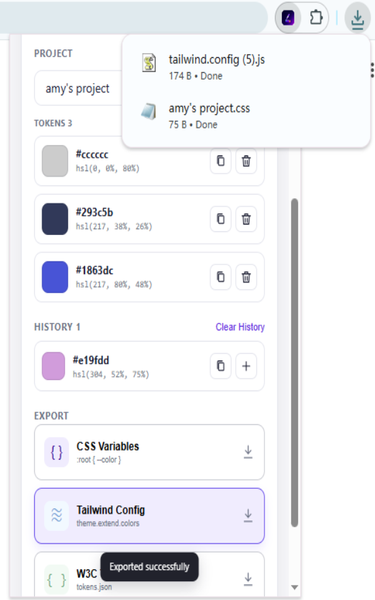
Reuse the reference colors, organize them in a project, and carry the selected palette into a Tailwind Config starting point.
Start with a real interface whose colors you want to bring into a Tailwind project.
Explore workflow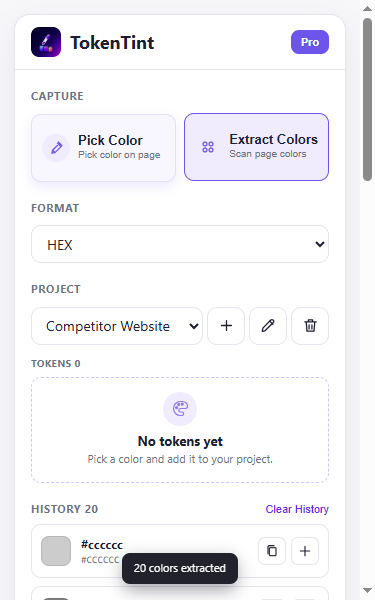
Scan the active page for a broader starting palette instead of picking every color one by one.
Explore workflow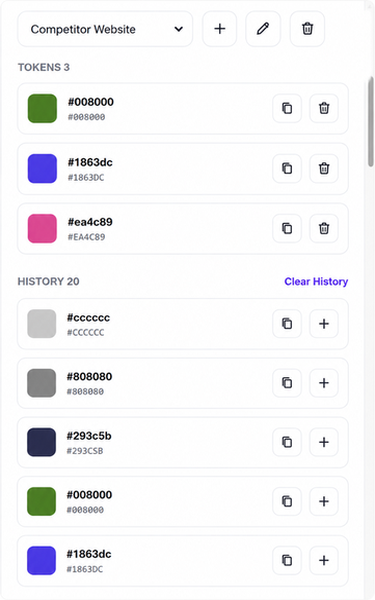
Keep colors together in the selected project and choose the values that belong in the Tailwind theme.
Explore workflowDownload a config-ready color object and refine names, shades, and conventions in your codebase.
Explore workflowTAILWIND CONFIG
The export gives your codebase a config-ready starting point. You remain in control of semantic names, shade scales, and how the palette fits your project.
theme: {
  extend: {
    colors: {
      brand: '#635BFF',
      surface: '#F7F8FB',
      ink: '#10131A'
    }
  }
}Why TokenTint instead of a basic color picker? it preserves the relationship between your reference webpage and the colors you bring into Tailwind, while leaving semantic naming and shade design decisions under your control.
Collect the colors from the active webpage, organize the useful values in a TokenTint project, and use Pro to export a Tailwind Config starting point.
Yes. TokenTint exports the colors you collected as a config-ready color object. You can then refine names, shades, and semantic roles in your codebase.
No. TokenTint does not promise automatic 50–950 shade generation. The export reflects the colors you collected, and you can define shades and semantic names in your project.
Tailwind Config export is a Pro feature. Free users can still pick colors, organize one project palette, and export CSS Variables.