TokenTint for frontend workflows ●
CSS Variables Generator from Website Colors
Pick colors from a live webpage, keep them together in a project palette, and export reusable CSS custom properties without retyping every HEX value.
✓ Free forever · No credit card required
A calmer way to build color systems
The problem
Copying colors from a browser into a stylesheet one at a time breaks the connection between the reference page and the code. Values end up scattered across notes, duplicate declarations, and inconsistent variable names.
How TokenTint solves it
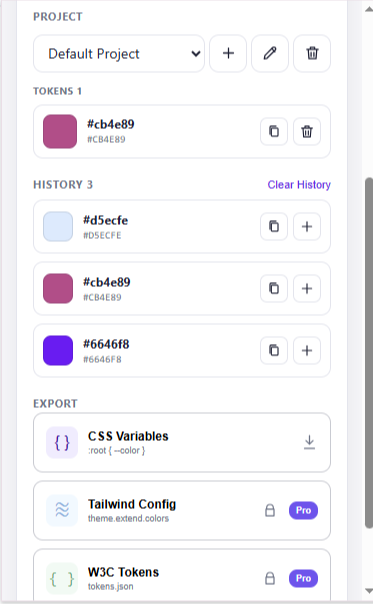
TokenTint keeps the workflow in one place: collect webpage colors, review them as a palette, and export CSS Variables for free. The export is a clean starting point that you can rename and organize around your own component or design-system conventions.
A better color workflow
From webpage colors to reusable CSS custom properties.
- 01 / COLLECTCollect.Pick the brand, surface, text, border, and accent colors you need from the active webpage.
- 02 / ORGANIZEOrganize.Review the values together and save the useful colors in one project palette.
- 03 / EXPORTExport.Download CSS Variables, then refine the names and semantic roles in your codebase.
CSS CUSTOM PROPERTIES
Export a palette your stylesheet can use.
Start with the colors you collected from a real interface, then refine the variable names to match your project conventions.
:root {
  --color-brand: #635BFF;
  --color-surface: #F7F8FB;
  --color-text: #10131A;
}Free vs Pro
Free
- Pick colors from webpages
- HEX, RGB, and HSL formats
- 20-color history
- Single project palette
- CSS Variables export
Pro
- Everything in Free
- Extract key page colors
- Multiple project palettes
- Tailwind Config export
- W3C Design Tokens export
Why TokenTint instead of a basic color picker? it connects the source webpage, the palette you selected, and the CSS output. A basic converter only changes formats; TokenTint preserves the color-collection workflow that comes before implementation.
Frequently asked questions
How do I create CSS variables from website colors?
Open the website in Chrome, pick the colors you need with TokenTint, save them to a project palette, and export the palette as CSS Variables.
Is CSS Variables export free?
Yes. The free version includes one project palette and CSS Variables export. Pro adds page color extraction, multiple projects, Tailwind Config, and W3C Design Tokens.
Does TokenTint automatically choose semantic variable names?
The export provides a practical starting structure. You remain in control of names such as brand, surface, text, and border so they match your codebase.
Are my saved colors uploaded?
No. Colors and projects are stored locally with Chrome storage rather than synced to a TokenTint account.