01TokenTint
Pick in the browser
Sample a color without leaving the webpage you are studying or building.
TokenTint for frontend workflows ●
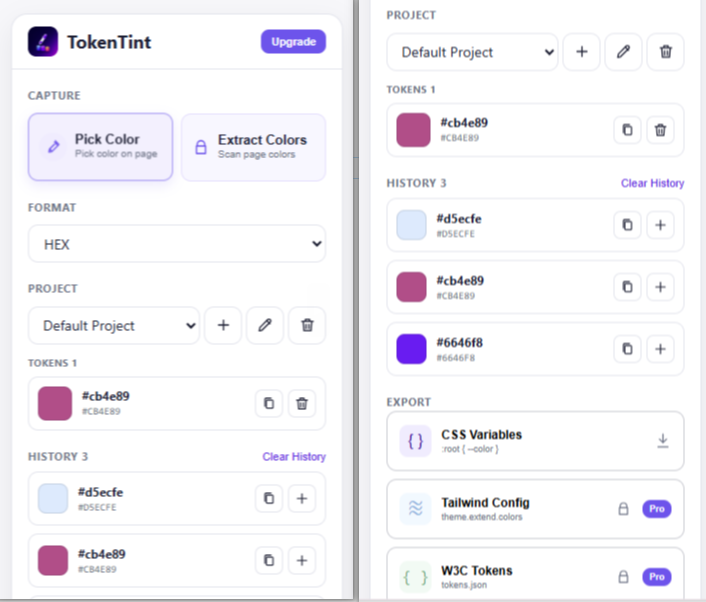
Pick a HEX, RGB, or HSL color directly from a webpage, review your recent color history, and save the useful values in a reusable project palette.
✓ Free forever · No credit card required
A calmer way to build color systems
Browser color work often means picking the same area more than once, losing a copied value in a notes file, or switching between formats manually. A basic eyedropper gives you one color, but not a useful place to review the colors around it.
TokenTint keeps the browser picking step simple: choose a color, switch between HEX, RGB, and HSL, review your recent history, and save the useful values to a project palette. It is designed for quick frontend and UI work before you need a full design-system process.
A better color workflow
Why TokenTint
Sample a color without leaving the webpage you are studying or building.
Review recent colors and preserve the small palette around a page or component.
Switch between HEX, RGB, and HSL before moving a color into your project.
Why TokenTint instead of a basic color picker? a basic eyedropper answers what color is under the cursor; TokenTint also keeps the recent colors, formats, and project context you need while building the interface.
It is a browser extension that lets you sample colors directly from webpages and copy their values. TokenTint supports HEX, RGB, and HSL.
Open TokenTint on the active webpage, start the eyedropper, select the color you need, and copy its HEX value. You can also switch the same color to RGB or HSL.
Yes. The free workflow keeps the 20 most recent picked colors so you can review and reuse them during a task.
Yes. You can move useful colors from history into a project palette and export that palette as CSS Variables.
No. TokenTint uses an active Chrome extension workflow to pick from the webpage you are viewing.